Apps shaped one by one
SMALL TOOLS FOR REAL LIFE
Exactly the app I was looking for.
Nichful is an independent iPhone app brand from Japan. We notice the small needs that everyday life leaves unmet and shape them into thoughtful tools built to fit real life.

19 iOS apps, connected by one idea.















Nichful began in Japan in 2026.Today, people around the world use our apps.
Days since the first release
Countries and regions reached
Downloads worldwide
—— DL
Loading world map.
VIEW ALL COUNTRIES
APP STORE CONNECT · LOADING DATE RANGE · MAP: NATURAL EARTH
Production and release record as of August 2026. World-first and category-leading claims are based on App Store listings at launch and Nichful research.
THE STANDARD
If we make it,we aim to make it the best.
Deeper capability. More certain learning.
A tool with no substitute for the person who needs it.
PROOF 01 / DEPTH — MAKER'S NOTE
MAKER'S NOTE · HANDMADE MANAGEMENTNo.1 feature count
for maker-management appsJUL 2026 · 5 APPS / 37 CRITERIA
for maker-management appsJUL 2026 · 5 APPS / 37 CRITERIA
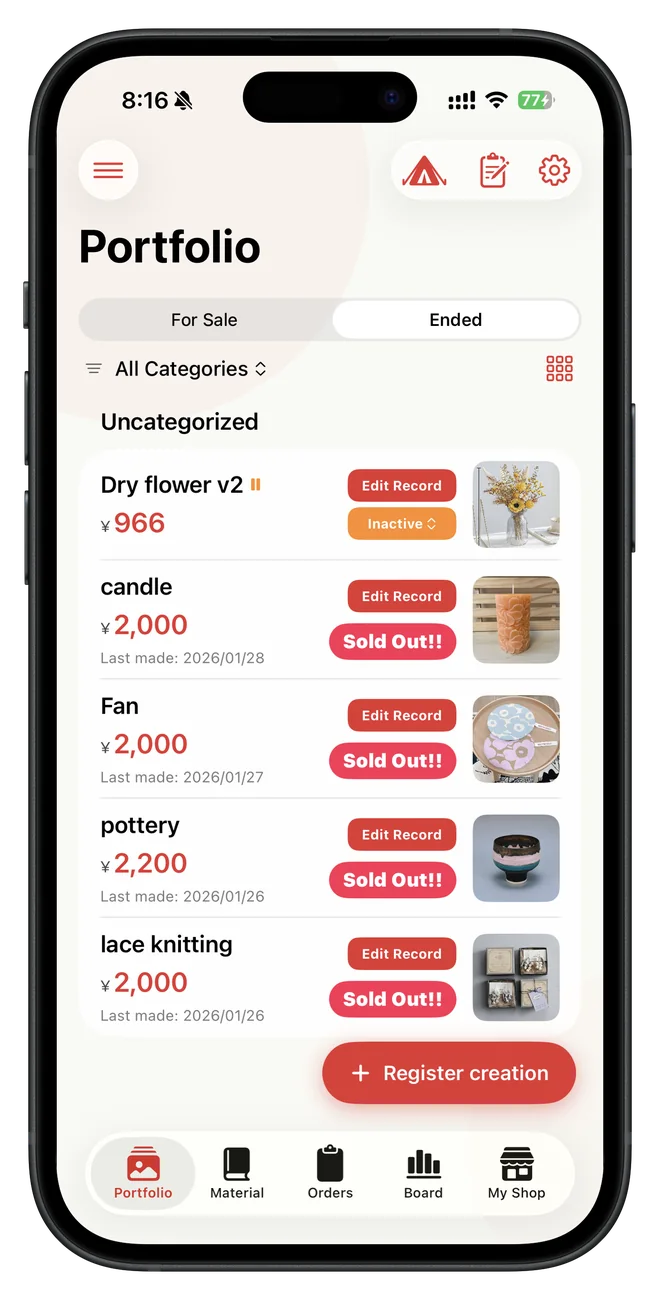
A smart notebookmade for makers.
Materials, costing, production, orders, sales, and reports—Maker's Note connects the full flow of a maker's business and keeps evolving from real feedback, often within days.
- 4.7
- App Store Rating
- 68
- Updates since first release
- 480 yen
- Annual plan
Designed with makers,
improved by their voices.
MAKERS' VOICES
Makers’ voices
shape what comes next.
Everyday ideas and pain points arrive through the feedback box.
Each one helps shape the next update.
Intuitive daily entries organize costs, stock, inventory valuation, and sales automatically.
It replaces the anxiety of “How should I manage all this?” with a clear routine.
“An amazing app.
This is exactly what I was looking for.”
UPDATE STREAM
68 updates since the first release, including three major upgrades.
2026.02 — 2026.10 v4.2.0 · HOVER / TOUCH TO PAUSE
- v1.1First edition release
Released the first version for managing a maker’s work in one place.
- v1.3Supports 5 languages
Added Korean, Simplified Chinese, French, and Spanish.
- v1.3.1Inquiry and review links
Added direct paths for support requests and App Store reviews.
- v1.3.2Multiple photos per work
Made it possible to keep several photos with each work.
- v1.4.0Added map function
Added the ability to see the spread of activities on a map.
- v1.4.1Onboarding/UI improvement
Improved basic operations such as initial guidance and sales channel editing.
- v1.4.2Sort/CSV output
Supports organizing works and linking data to accounting software.
- v1.5.0Shopping memo/inventory link
It connects everything from purchasing materials to inventory consumption during production.
- v2.0.0Made to order/Customer/Register
A major update that supports everything from orders to customer management and face-to-face sales.
- v2.0.1Offer code compatible
Campaign codes can now be entered within the app.
- v2.0.2Delivery company/work category
Freely manage shipping methods and work classifications according to your activities.
- v2.0.3Grid display
You can also check the works and materials in a photo-based list.
- v2.1.0Add "My shop"
Added a screen that allows you to view sales and activity areas as if it were your own store.
- v2.1.1Added 3 languages
Expanded support to traditional Chinese, German, and Italian.
- v2.1.2Improved material selection UI
Improved the ability to easily select materials for production while looking at photos.
- v2.2.05 Report/Customer analysis
Added five reports and deeper customer analysis for the business side of making.
- v2.3.0Loss cost/disposal countermeasures
Record scraps and failed products to manage inventory more accurately.
- v3.0.0Maker's Note / iPad upgrade
The platform for reviewing daily activities and the work environment on the iPad have been revamped.
- v3.0.1Map reflection/shop registration
Corrected the reflection of sales history and made the initial settings easier to understand.
- v3.0.2Added diagnostic log
You can now share the status of a problem with the developer with just one tap.
- v3.0.3Fixed screen drawing bug
Based on the feedback we receive, we immediately respond to display issues on specific devices.
- v3.1.0Add activity diary
Automatically create daily records from sales, production, orders, and purchasing.
- v3.2.0AI Weekly/Monthly Summary
AI creates a review report based on the activity diary.
- v3.3.0ToDo/sales total for the day
Easily manage to-dos and check sales on the day of the event.
- v3.3.1Smarter feedback
Automatically adds device details so feedback can be handled faster.
- v3.4.0Seven widget themes
Put sales, orders, inventory, making, and more on the Home Screen.
- v3.4.1Clearer layouts
Fixed layout and text visibility issues across languages and display modes.
- v3.4.2More widget colors
Choose from 15 colors independently for every widget.
- v3.4.3Maker dashboard
See a richer overview of the whole business in a large widget.
- v3.4.4Saving and diagnostics
Fixed a work-saving issue and strengthened diagnostic logging.
- v3.5.0Accounting CSV and lists
Improved CSV preparation for three accounting services and collection management.
- v3.6.0Event hub
Combined event checkout and sales records with views by date, venue, and item.
- v3.7.0Events and precise costing
Connected planning-to-analysis workflows and improved decimal pricing and FIFO costs.
- v3.8.0Recommended prices and work QR codes
Calculate prices from profit and labor goals, then create photo-based QR codes.
- v3.8.1App Store listing refresh
Clarified the app's features in its store listing, with no in-app feature changes.
- v3.8.2Material QR codes and A4 label PDFs
Arrange QR labels for works and materials together on one printable A4 PDF.
- v3.8.3iCloud sync and iPad layouts
Improved sync diagnostics and fixed layouts affected by photo aspect ratios.
- v3.8.4Material category ordering
Made custom category order appear correctly in headings and filters.
- v3.8.5Material balance controls
Adjust remaining amounts by slider, direct input, or press-and-hold buttons.
- v3.8.6Order history and shared options
Edit past order dates and share priced options across multiple works.
- v3.8.7Event sales and work duplication
Link sales to events more flexibly and duplicate works with materials and pricing.
- v3.8.8Bulk editing for custom items
Edit and remove categories, units, sales channels, and other items in one place.
- v3.9.0Work and material subcategories
Add one level of subcategories with safe reordering, moving, and deletion.
- v3.9.1Ten-language translation and layout
Reviewed all ten languages and improved layouts for long and large text.
- v3.9.2Defaults, customer links, and discounts
Add default channels and carriers, customer selection, and discount options.
- v3.9.3Percentage options and order photos
Adjust prices by percentage and attach multiple photos to order notes.
- v3.9.4Shipping inventory and stock value
Update stock on shipment and review quantity, cost, and retail value.
- v3.9.5Order filters and review photos
Filter order items by category and add multiple photos to customer feedback.
- v3.9.6Planned works and daily to-dos
Prepare works before sale and organize tasks by today, upcoming, and completed.
- v3.9.7Material search, inventory, and costing
Search materials and control inventory and cost treatment in greater detail.
- v3.9.8Shops, attributes, and decimal quantities
Organize suppliers and attributes, with usage quantities down to 0.01 units.
- v3.9.9Favorites and redesigned shop hub
Favorite works and materials, and find tools in a clearer purpose-based hub.
- v3.9.10Material duplication
Choose which details to copy when adding color or size variations.
- v4.0.0Production processes
Keep ordered steps, descriptions, and photos, and carry them into duplicated works.
- v4.0.1Prototypes and handmade parts
Keep prototype photos, improvements, and costs, then manage stock and costing for handmade parts.
- v4.0.2Order search and date links
Find orders by customer or order number, and carry date corrections into related records.
- v4.0.3Order corrections and first steps
Correct contact and shipping details after ordering, with guided steps for the first material and work.
- v4.0.4Reports and event profit
Match reports to the selected currency and language, and review event profit with material and labor costs.
- v4.1.0Creative connections and Excel export
View all works and their links to parts and materials, then save the full set of records in Excel.
- v4.1.1Inventory for order options
Set items and quantities used by priced options, and update stock when production or shipping is confirmed.
- v4.1.2Opening stock and checkout order
Correct opening stock without changing historical costs, and use collection ordering at event checkout.
- v4.1.3Opening-stock balance controls
Adjust opening-stock balances with direct input, a slider, or plus and minus buttons.
- v4.1.4Event sale cancellation and guidance
Cancel mistaken event sales, review how stock is returned, and follow the checkout guide.
- v4.1.5Checkout category filters
Find works by category or subcategory at event checkout while keeping the current cart.
- v4.1.6Customer catalog and fabric costing
Show a customer-facing catalog without internal details, and calculate fabric usage from cutting dimensions.
- v4.1.7Unified to-dos and parts management
Review everyday and event to-dos together, with clearer part deletion, balances, and cost displays.
- v4.1.8Part instructions and usage reports
Document part-making steps with multiple photos and report usage for prototypes, gifts, and discarded items.
- v4.1.9Activity time and hourly estimates
Calculate estimated amounts from activity time and hourly rates, with time templates and closing dates by person.
- v4.2.0Purpose-based menus and opening stock
Reorganize menus, collection controls, and material entry, and register opening stock for finished works.
PROOF 02 / REACH — PMP ECO2026
PMP ECO2026 · 7 LANGUAGESWorld-first seven-language
PMP exam prepAPP STORE AVAILABILITY / NICHFUL RESEARCH
PMP exam prepAPP STORE AVAILABILITY / NICHFUL RESEARCH
Seven languages.
One new PMP exam.
Built to reach further.
ECO2026 focuses on scenario questions that test judgment and application skills in accordance with practical situations, rather than memorization of knowledge. A total of 1,440 questions reflect the new criteria, which has been changed to People 33% / Process 41% / Business Environment 26%.
- 1,440
- PMBOK 8th edition/ECO2026
Number of questions supported - FIRST
- ECO2026 compatible
World's first - 7 languages
- Japanese, English, Chinese (simplified/traditional), Portuguese, Arabic, German
ECO
2026
2026
PROOF 03 / FRONTIER — ANTHROPIC
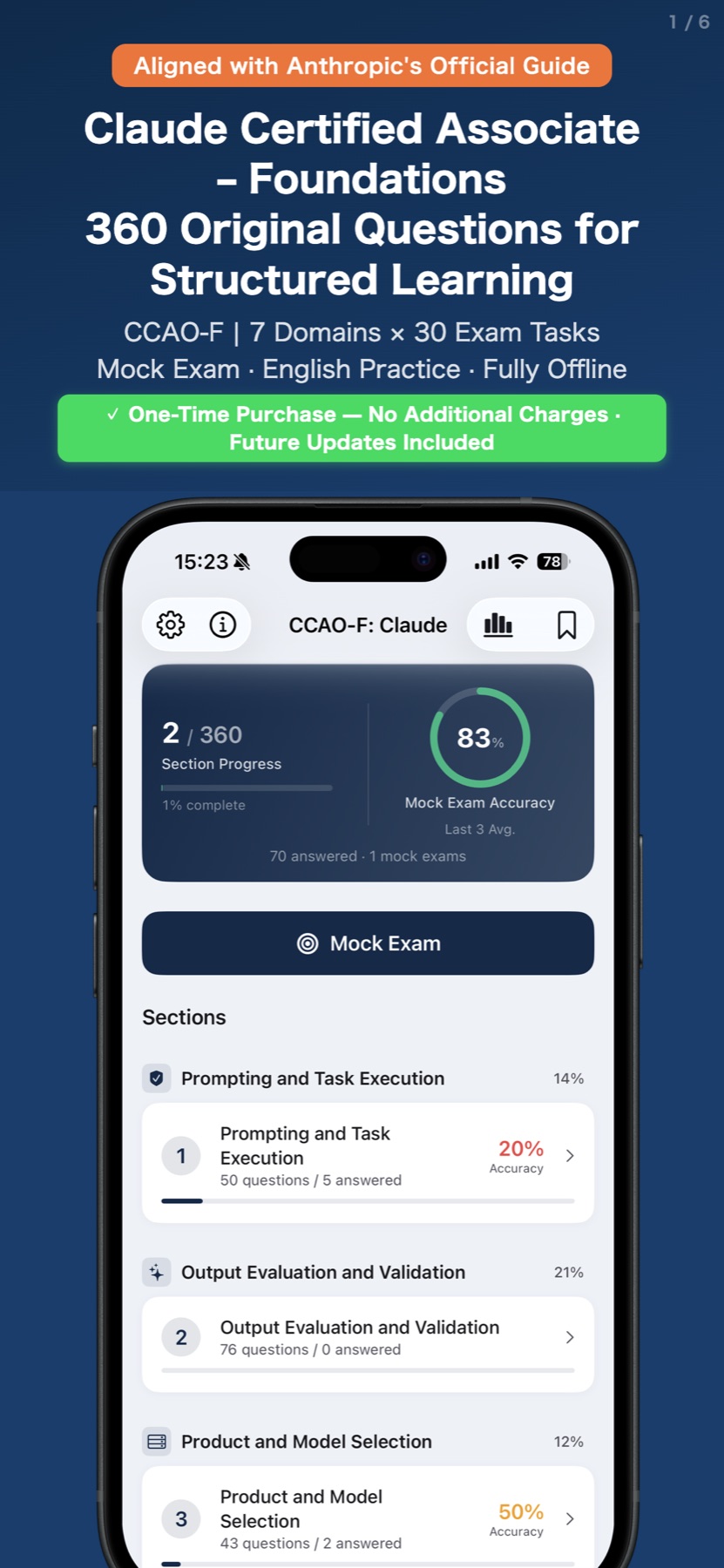
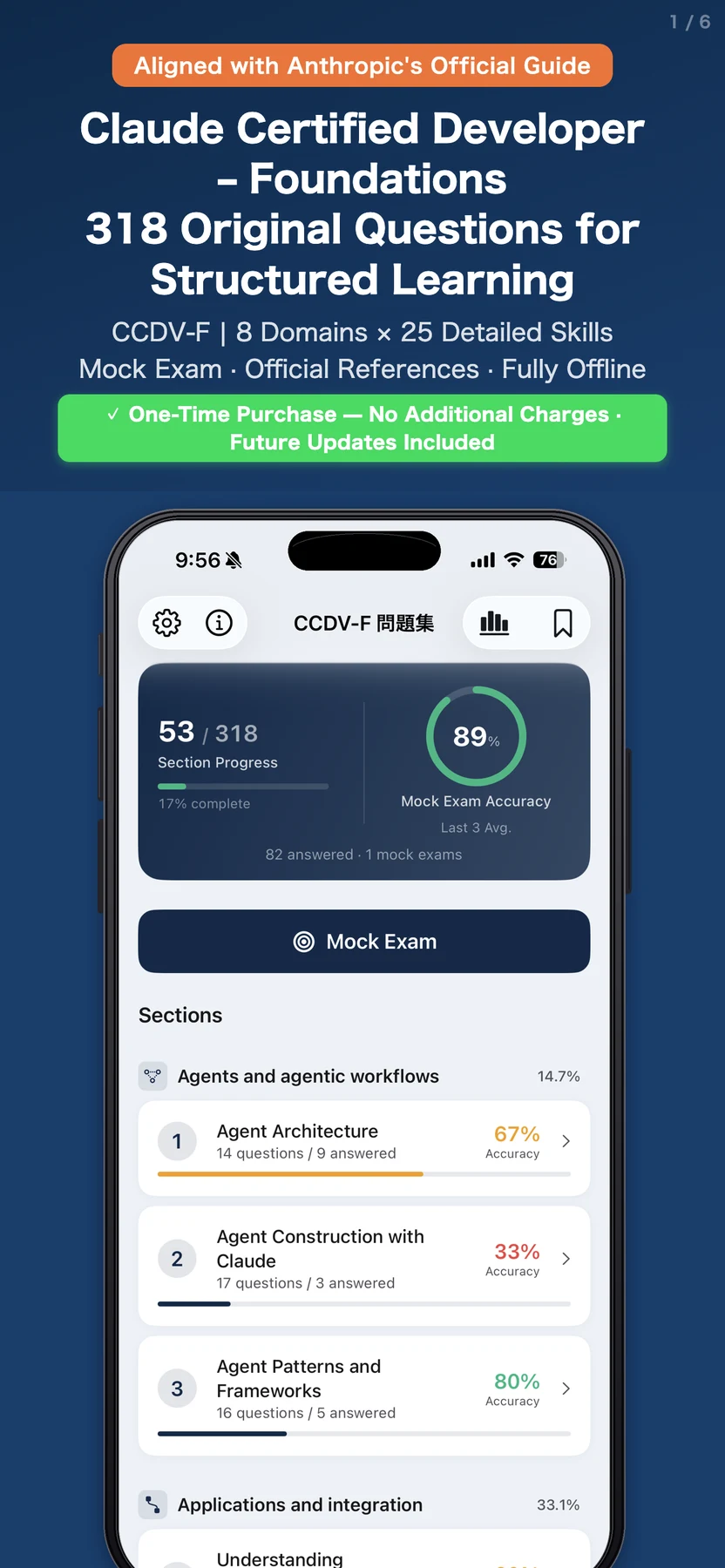
CLAUDE CERTIFICATION · 4 APPSFirst launched on the App StoreJUL 19, 2026 · APP STORE AVAILABILITY / NICHFUL RESEARCH
Four world firsts
for Claude
certification.
The Claude certification exams were reborn as a new four-exam program on July 13, 2026. On July 19, 2026, Nichful became the first in the world to launch exam-prep apps for all four certifications.
- 4 EXAMS
- From Foundations
to Professional - 4 APPS
- A dedicated Nichful app
for every exam - 3 ROLES
- Associate, Developer,
and Architect
APP STORE ↗
APP STORE ↗

APP STORE ↗

APP STORE ↗
USE · BUILD · DESIGN · OWN ·
ALL PRODUCTS
Start with your goal.
Find the tool
that fits.
From everyday life and learning to making, health, and fandom. Every released app is free to download.
01Maker's NoteFeature-rich / 4.7 rating↗
02PMP Exam Prep1,440 questions / 7 languages↗
03Anthropic CertificationCCAO-F / CCDV-F / CCAR-F / CCAR-P↗
04AWS CertificationAIP-C01 / 520 questions↗
05
Microsoft CertificationAI-103 / AB-730 (in review) / AB-900 / AI-300 / GH-300 / GH-900↗
06HomeBoardFamily sharing / Free↗
07StralApple Watch / 7 languages↗
08PhysiqueNote30 seconds input / HealthKit↗
09Calc+Free / 10 languages↗
10MyFanClub9 languages / no ads↗
11WordWolfPartyOffline / 5 languages↗
Maker's NoteFeature-rich / 4.7 rating↗
02PMP Exam Prep1,440 questions / 7 languages↗
03Anthropic CertificationCCAO-F / CCDV-F / CCAR-F / CCAR-P↗
04AWS CertificationAIP-C01 / 520 questions↗
05
Microsoft CertificationAI-103 / AB-730 (in review) / AB-900 / AI-300 / GH-300 / GH-900↗
06HomeBoardFamily sharing / Free↗
07StralApple Watch / 7 languages↗
08PhysiqueNote30 seconds input / HealthKit↗
09Calc+Free / 10 languages↗
10MyFanClub9 languages / no ads↗
11WordWolfPartyOffline / 5 languages↗
WHY NICHFUL
Tools that fit real life,built with dependable quality.
Nichful is defined not only by what we make, but by how carefully each app is built and delivered.
See our commitment to quality ↗AI-driven development,with speed and quality together.
We begin with a written spec. Planning, design, implementation, and testing stay traceable, with a different quality lens at every stage.
World-class privacy,
at an accessible price.
Data stays on the device and in iCloud, protected by Apple’s platform security. Avoiding unnecessary servers also helps keep prices accessible.
Designed for iPhone,in function and form.
Contacts, iCloud, Maps, notifications, and on-device AI—we use the depth of the iPhone platform to refine both capability and ease of use.
NICHFUL JOURNEY
Still small.
Able to move fast and go deep.
About Nichful ↗
- from one app
In January 2026, Calc+ became the first release—turning one small frustration into a useful iPhone tool.
- New fields, and a new way of building
As the work expanded into making, daily life, and learning, the spec-driven agent workflow grew more capable and rigorous.
- Keep improving 19 apps
Release is not the finish line. We read what users send us and keep improving each app for the people who need it.