Handmade artist'sExclusive secretaryapp
Manage your handmade business,
all in one app.
Have you ever encountered something like this while continuing to create works?
- I wonder if this work will make a profit...
- Where did you buy that material and how much did it cost?
- I accidentally forgot the delivery date of my order!
- Where should I start when filing a tax return?
- Come to think of it, what have I made so far?
All those worries.
For 40 yen per month,
Maker's Note takes care of the rest.
From work management, cost accounting, material inventory, orders, sales, tax return forms, to recording and reviewing activities. All functions for handmade artists in one.
 with camera
can be read
The joy of making. The happiness of looking back.
Each work is filled with trial and error, night cooking, and the smiles of our customers. A place where you can leave all of that accumulation in place. That's a writer's notebook.
CREATE
Turn every piece the cost, and the materials. You can easily keep a record of your creations.
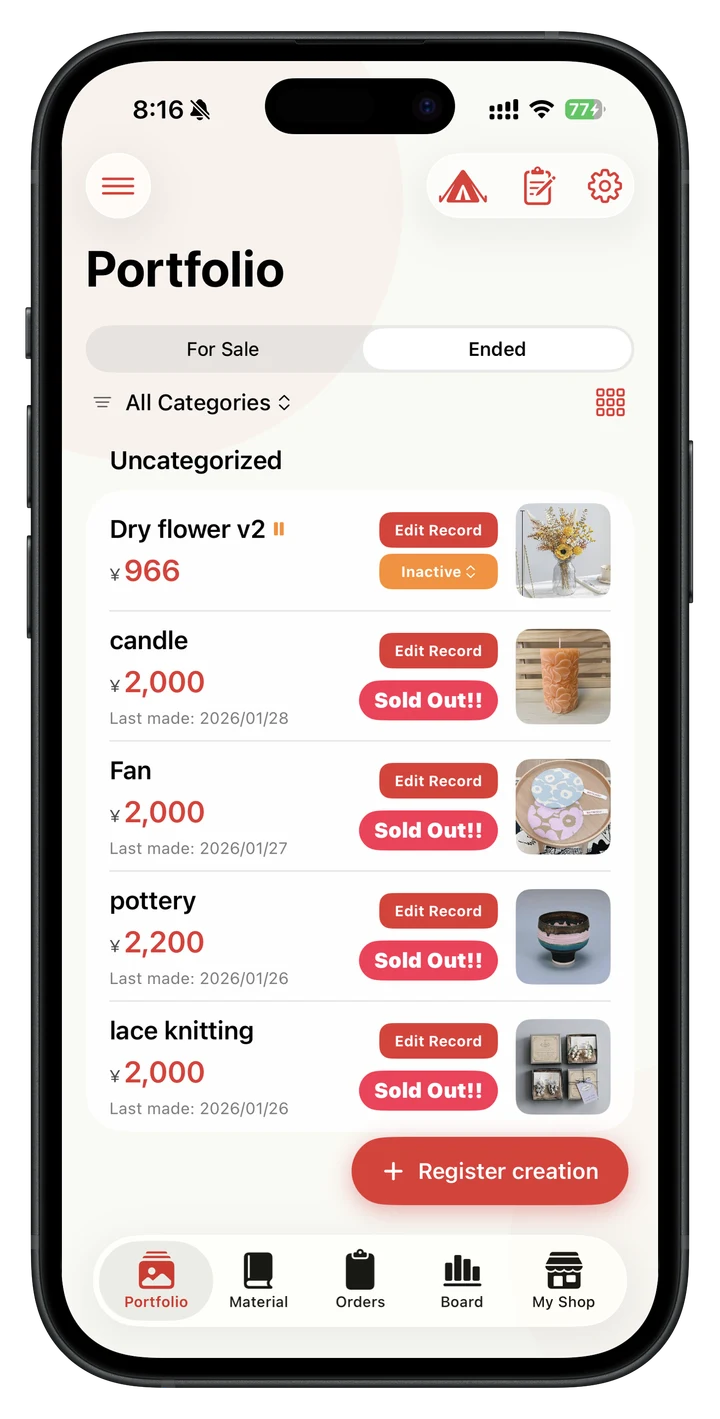
Work gallery
Turn every pieceinto a portfolio.
Record your creations with photos. You can switch between list view and grid view with one tap, and your own collection of works will expand.
- List ⇄ Switch grid freely
- Manage a list of works along with photos
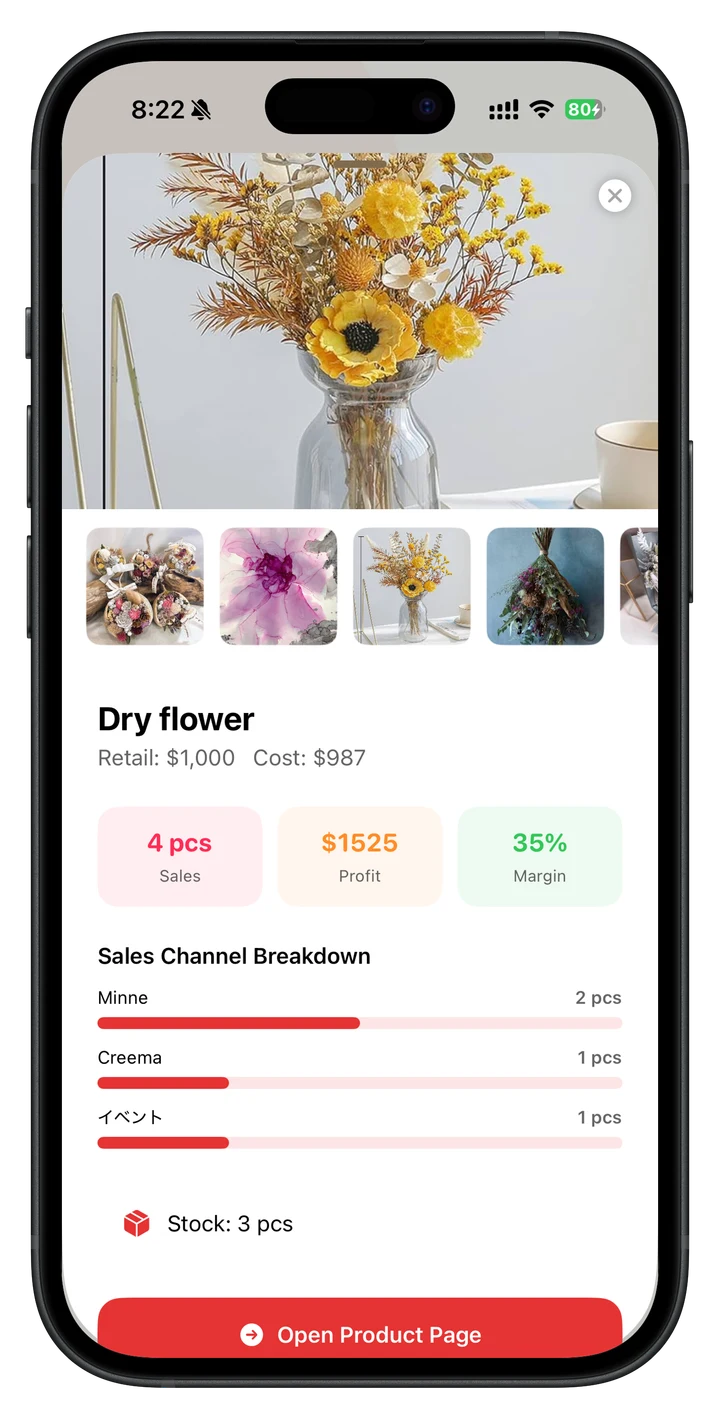
Work summary
See each product's performanceat a glance.
Displays the number of productions, sales channels, total sales, and total profits for each work. You can quickly see which works are the top earners.
Production record
Log productionwith one tap.
Just record the number you made with a tap. As the number of production increases, the inventory of materials is automatically used up, and it is also automatically linked to inventory sheets and tax return forms.
- Automatic linkage from production → inventory consumption → forms
- For rejected works, materials are consumed but not recorded in inventory.
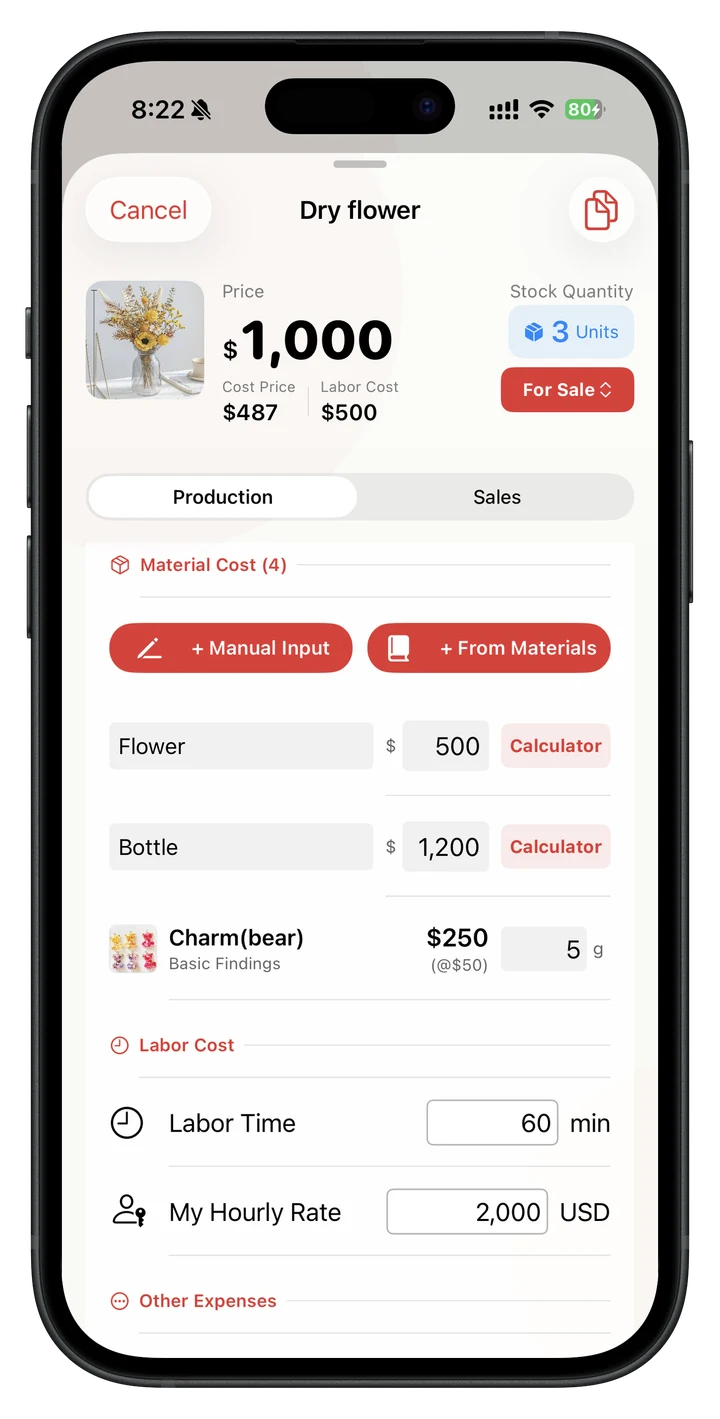
Cost calculation × appropriate price
Move beyondguesswork pricing.
Calculate material cost by entering the amount purchased and used, or by selecting materials and quantities from your material book. Maker's Note then calculates a recommended selling price from your target profit margin, material markup, other expenses, and labor target—and shows you the full breakdown.
- Choose direct calculation or material-book integration
- See a recommended price with profit, expenses, and labor itemized
Reproduction
Duplicate similar productsin one tap.
If you want to make a product in a different color or size, use the duplicate function to copy the entire recipe. Materials and expenses will be inherited, so there is no need to enter them from scratch.
Production notes
Keep the details and ideasbehind every piece.
The difficulties and tips of production, the thoughts put into the work, and even the sales strategy. You can freely write down notes for each work. If you read it later, it will give you hints for your next work.
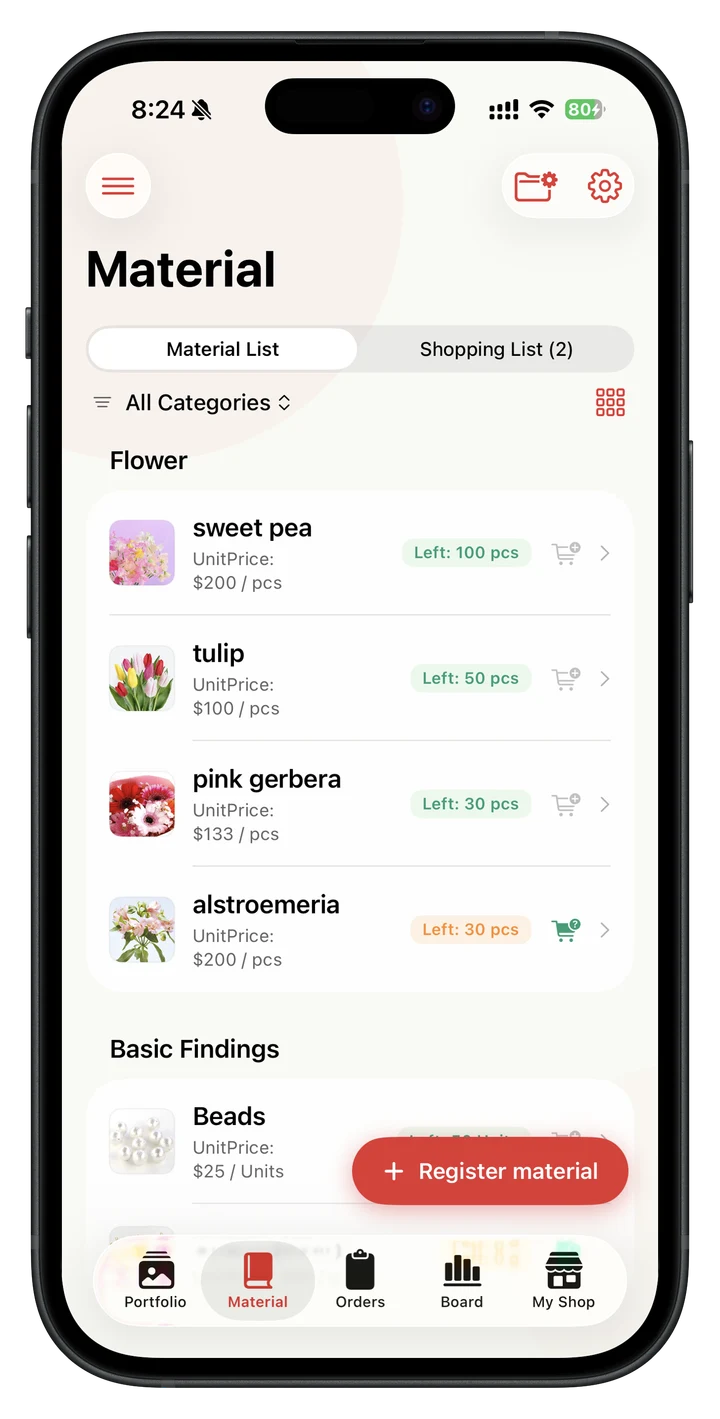
Material book x shopping memo
Manage material costsand inventory together.
Keep purchase history, unit cost, and remaining quantity together. Low-stock materials are added to your shopping list automatically, and you can create QR labels that show the material name, color, size, or your own label note.
- Scan a material QR code to open its details
- Arrange product and material labels on one A4 PDF to share or print
SELL
Sales, orders, and relationships with customers. We support the entire sales site.
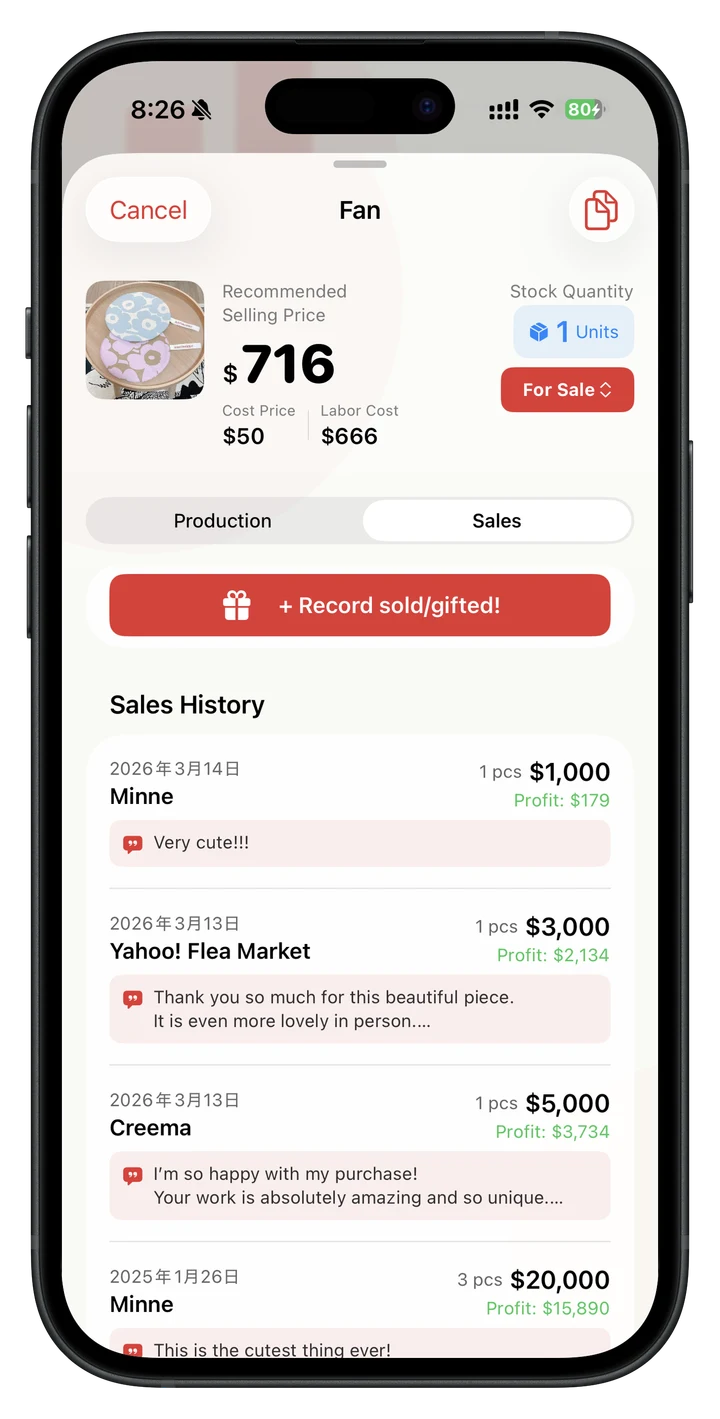
Sales record x customer feedback
Record where it soldand for how much.
Quickly record the sites and amounts sold. You can also leave happy words from customers. When you record sales, inventory is automatically linked, so you don't have to do it twice.
- Record sales channels, amounts, and customer feedback
- When recorded, inventory is automatically linked
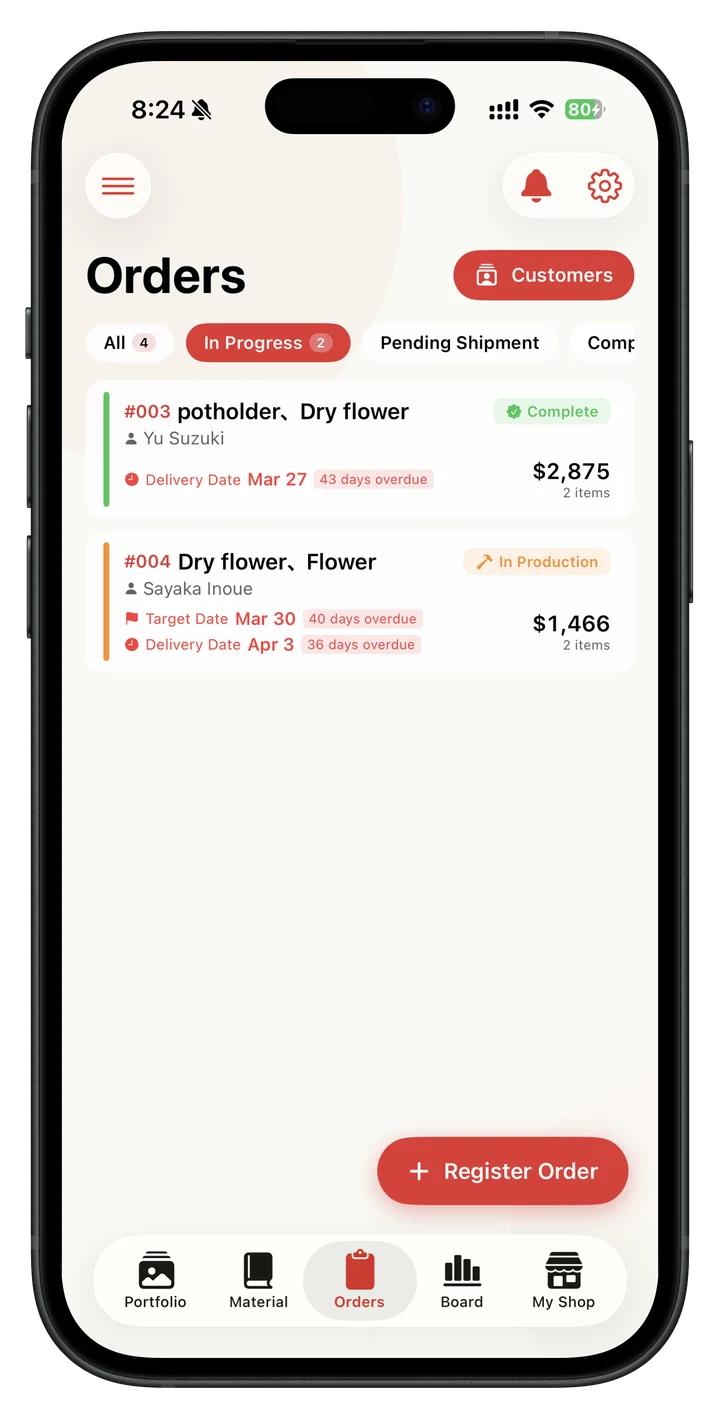
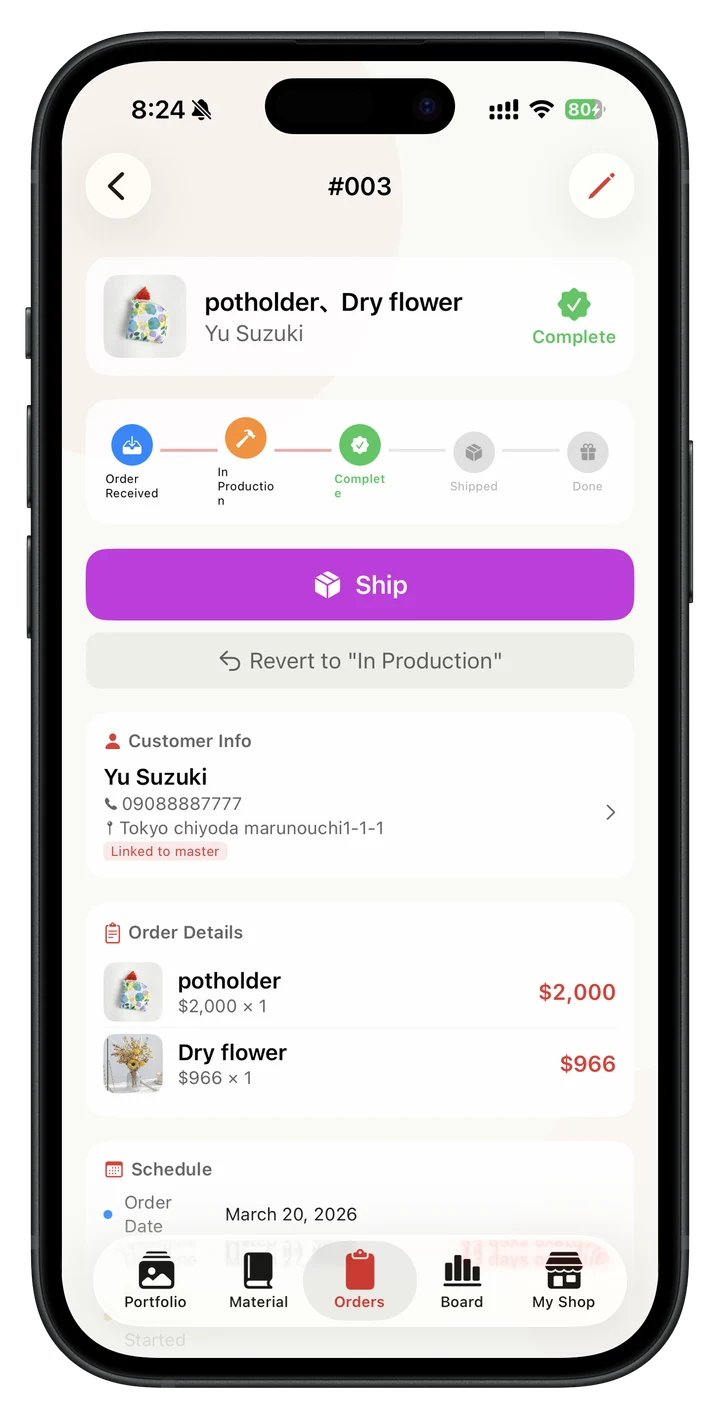
Order management
Track every orderby production stage.
Manage made-to-order work from order → production → completion → shipping → delivery. You can edit dates for completed stages later, with the related sales and shipping-fee dates kept in step.
- Update each stage with one tap; use Kanban view on iPad
- Share priced options such as size, color, or accessories across products
Delivery date alert
Preventing "accidentally forgetting delivery dates"
If you set the production date and shipping date, you will be automatically alerted when the delivery date approaches. We can firmly keep important promises with our customers.
customer management
Build lasting customerrelationships.
You can manage customer information and check past purchase history and comments at a glance. Carefully cultivate relationships with repeat customers.
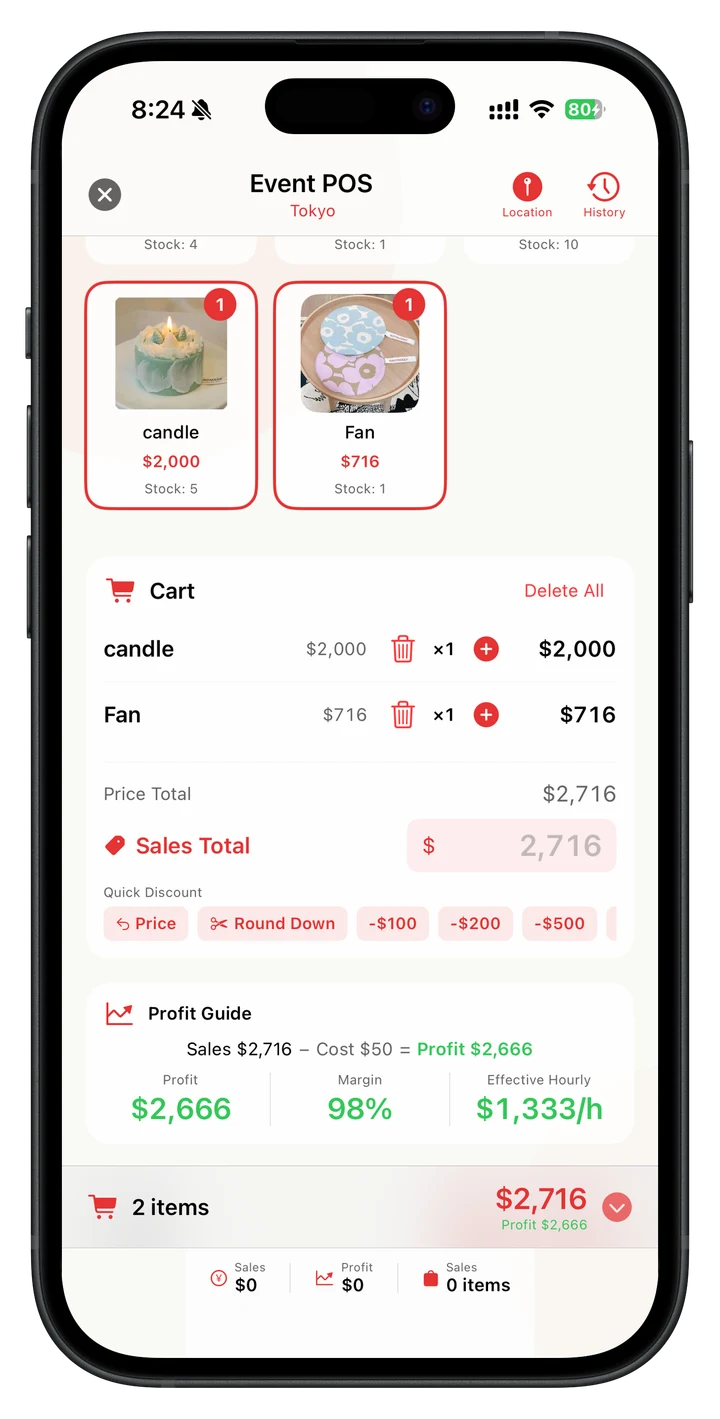
PREPARE → SELL → REVIEW
Manage an eventfrom start to finish.
Keep multi-day schedules, preparation tasks, items to bring, packing and returns, event expenses, maps, device calendars, and reminders in one place. During sales, scan a product QR code into the register, calculate change automatically, and check profit margin while discounting; afterward, review performance by venue, product, time slot, and more.
REFLECT
We made this much, sold this much, and reached this far. You can feel the steps.
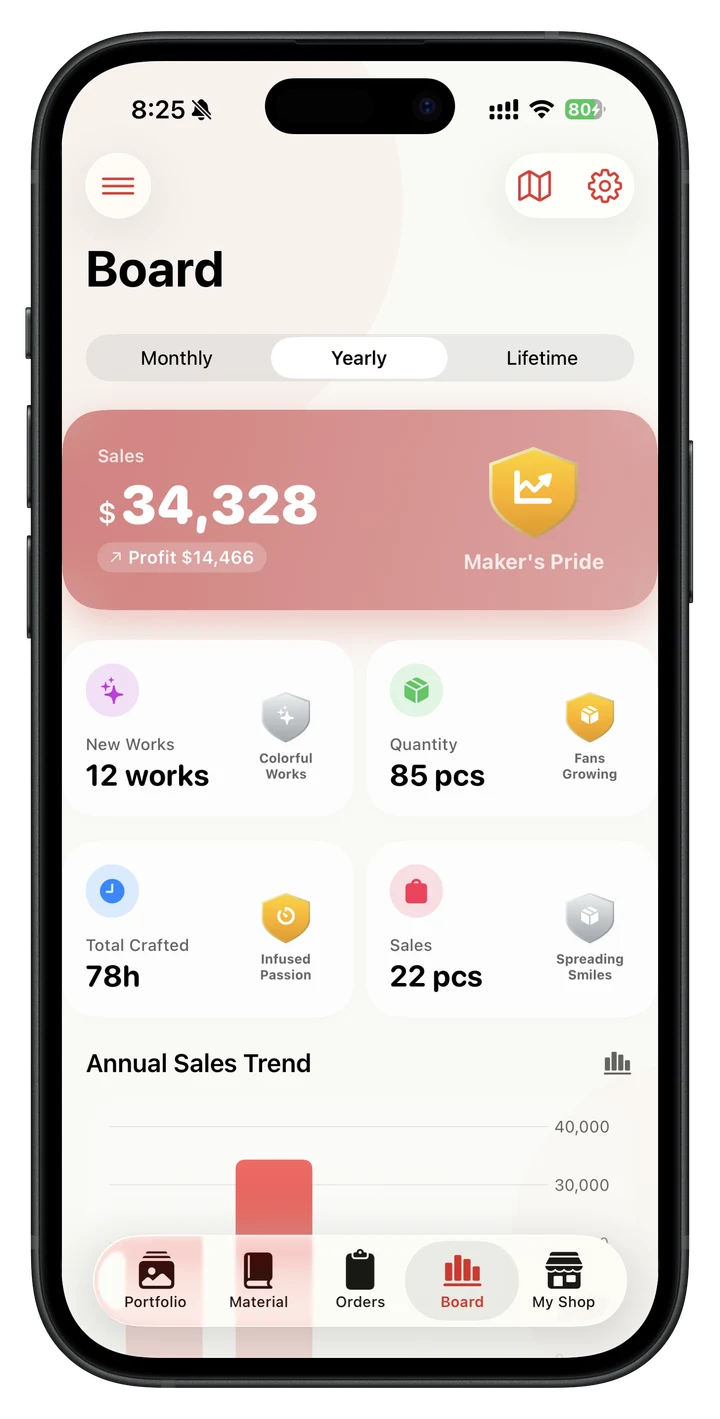
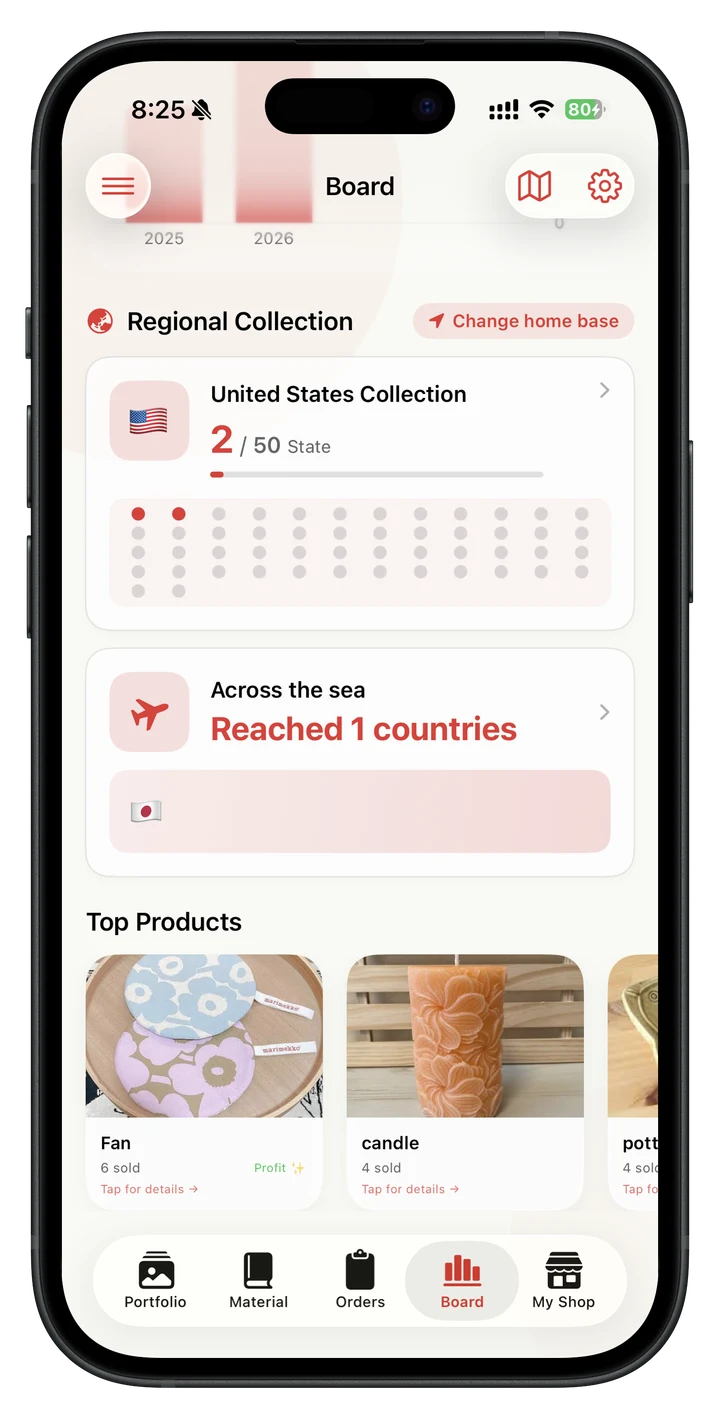
achievement board
See your hard workin the numbers.
This is a screen for looking back on the artist's activities to date. ``I made this much,'' ``I sold this much,'' and ``I reached this far.'' can be seen at a glance in graphs and rankings.
- Graphs showing trends in sales, profits, and sales numbers
- Earn medals by achieving milestones
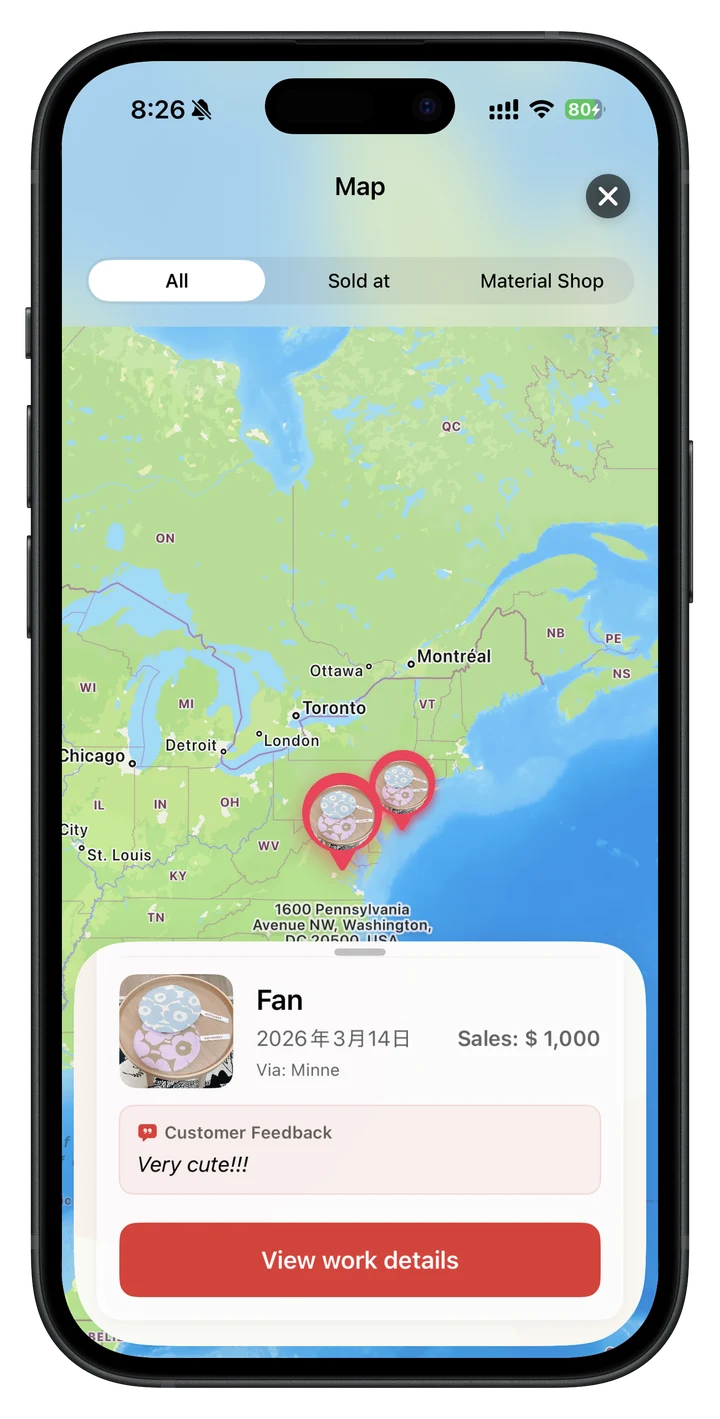
map
See where your workhas traveled.
Look back on the map to see where the work was delivered, suppliers, and event venues. The fun of filling up the map little by little will motivate you to create your next creation.
Activity diary
Your activity logbuilds itself.
It's okay if you're too busy to write in a diary. Automatically records the day's activities based on production history and sales history. Of course, you can freely edit it later.
- A diary is automatically kept just by doing activities.
- Free editing. I can also write your words
Weekly/Monthly AI Report
AIreview your progress.
Automatically create weekly and monthly reports. Using AI, you can review with higher accuracy. When using external AI such as ChatGPT or Gemini, just copy the output result and press the dedicated paste button, and it will be automatically reflected on the screen.

Built to support handmade creators.
This app was born from the idea that while following the activities of handmade artists on SNS, I wanted to help these people. As a creator, I will continue to listen to the voices of the artists and carefully develop them.
You can send feature requests at any time through the "Suggestion Box" within the app. Anonymous is OK. If you include your email address, we will listen to your story and make your request a reality.
my shop
Make it your ownworkspace.
Turn Writer's Notes into an app dedicated to your shop. You can customize various settings all at once from here.
Form output × Final tax return
Make tax preparationless stressful.
If you have daily records, the preparation for your tax return will be completed naturally. You can output reports such as sales lists, expense lists, inventory sheets, profit and loss statements, and customer transaction lists in CSV and PDF formats.
- Output 5 types of forms as CSV/PDF
- CSV compatible with freee, Yayoi Accounting, and Money Forward
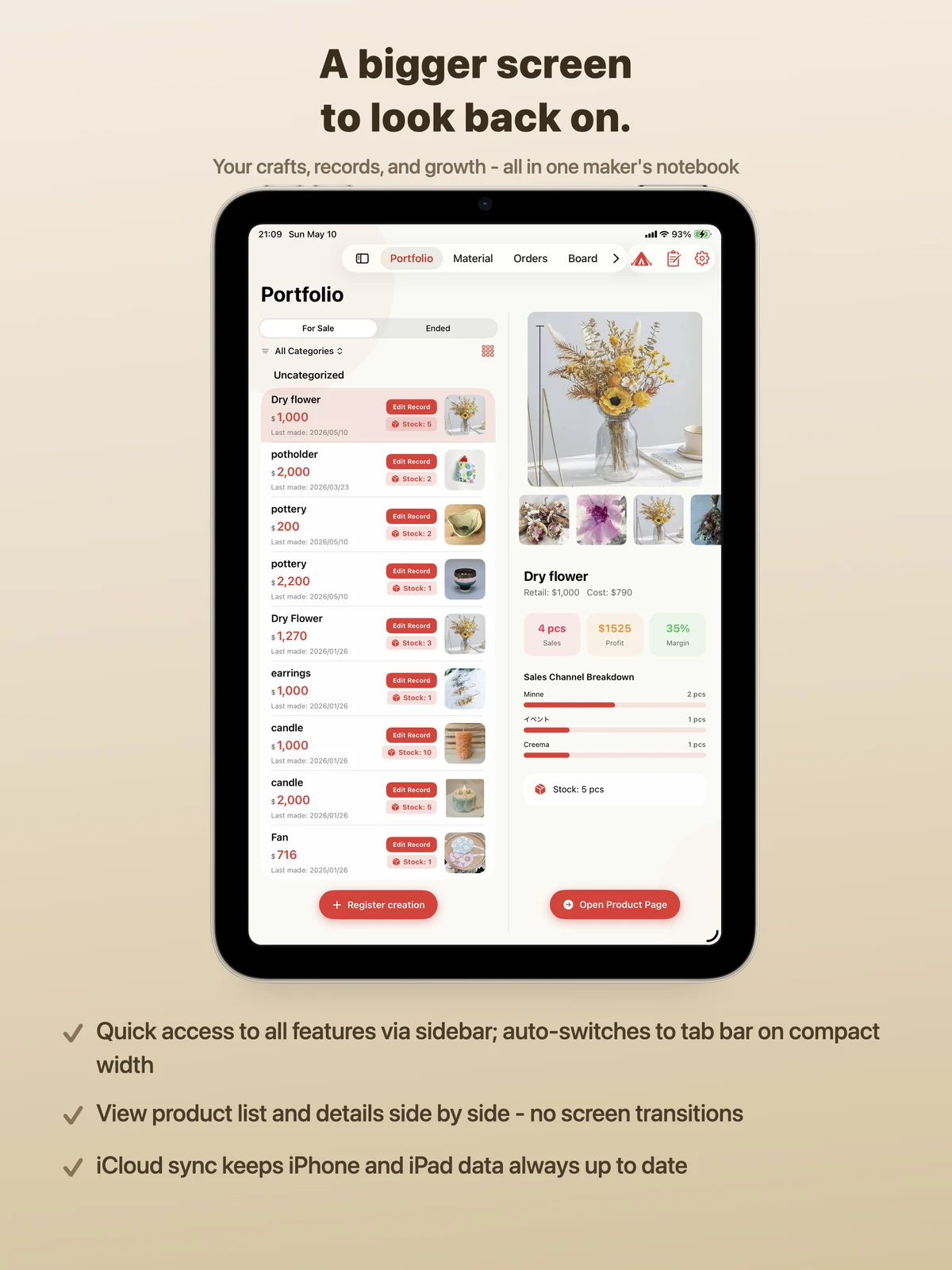
On iPhone or iPad,
wherever you work.
With iCloud sync, your iPhone and iPad data is always up to date. Use your iPad's large screen as a cash register at events, or check orders on your iPhone while you're on the move - use it to suit your work style.
First of allFreeSo why not try it for the first time?
It's free to download and continue to use. When you start making a lot and want to use it more, that's when you switch to Pro. ¥480 per year = ¥40 per month, approximately ¥1.3 per day.
Free plan
- Up to 10 works can be registered
- All functions except AI functions can be used
- Automatic activity diary is also free
- Cost accounting, materials, orders, cash register, forms...
Pro plan
- Work registrationunlimitedto
- diary'sAI sentence generation
- Weekly/monthly AI report
- AI draft generation for SNS posts
Even if you stop, your records will builds itself.. Even if you cancel Pro and return to the free plan, you will still be able to view all your accumulated works, activity diaries, reports, and other records. The trajectory of the artist's career, which has continued steadily, will always be in your hands. *There is also a family plan that can be used by families. Please check the App Store for the latest prices.
Who it is for
Frequently asked questions
Can I calculate the cost of handmade items?
Can I manage materials and inventory?
Can it be used as a cash register for event sales?
Can it also be used for sales management of minne and Creema?
Can I use it for free?
What kind of fee is "40 yen a month"?
Why is the price so low?
Do I have to write in my own diary every day?
How do I use external AI (such as ChatGPT)?
Will my records be deleted if I cancel the paid version?
Can I use it to prepare my tax return?
What devices are supported?
For those using Android, Windows, and Mac, there is a sister service with the same concept. Tsukurite Note(Web version, compatible with all devices) is also available.
For those who want to organize their management methods first. We have summarized in this article the idea of continuing work management, cost calculation, material/inventory management, event sales, and sales management on your smartphone.
Read how to manage handmade artists →
I'm not aloneFriends who support writers
We will introduce recommended services that share the same thoughts as Maker's Note.

Tsukurite Note
A work management service operated by the artist himself, with the same concept as Artist Note. It runs on the web, soWhether it's iPhone, Android, Windows or MacYou can use it. If you're thinking, "I can't use Writer's Notes because I'm on Android," please click here.
Create and view notes → Click here for Android, Windows, and Mac users
Kotte. Handmade
``Even though the work is good, people don't know about it.'' This is a wonderful media that introduces the work to the world on behalf of such artists, and conveys the charm of the work and the story behind it to the world. We are always recruiting authors for publication. It gently supports writers who are worried about their popularity.
Come on. View handmade → For artists who want to spread their work to the worldAll those worries.
Why not get started for just 40 yen a month?
May the records we have accumulated become treasures someday.
read with cameraDownload now